Do one thing,
and do it properly.

Tendforge builds focused WordPress plugins. Each one does a single job, all the way.

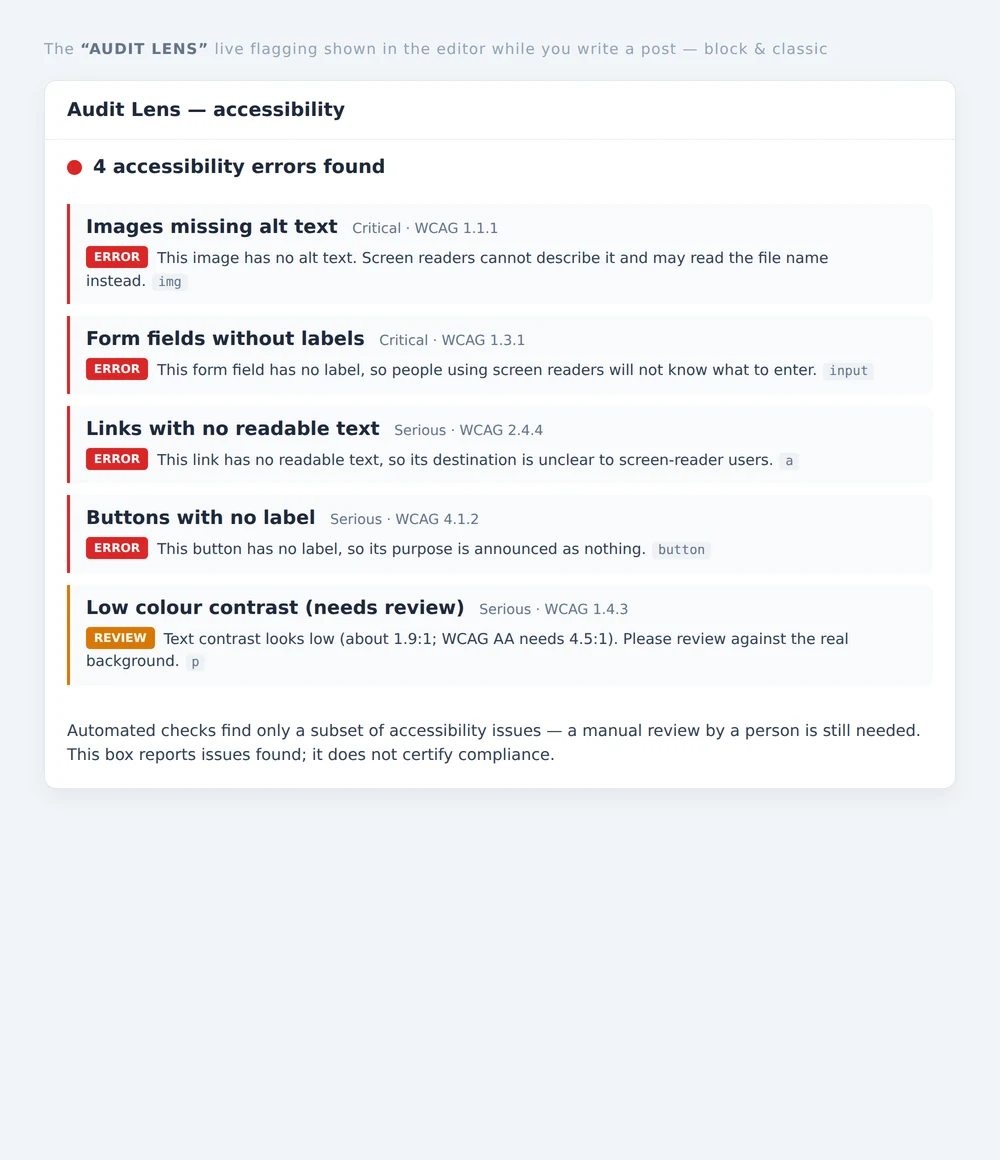
Audit Lens flagging accessibility issues directly on the content inside the WordPress block editor.
Issues flagged inline, in the editor
GPLv2 licensed 410 automated tests passing Passes wordpress.org Plugin Check 12 plugins (free + Pro), built and verified

Six plugins, each solving one real problem

Each one targets a specific problem, not a bundle of half-finished ones.

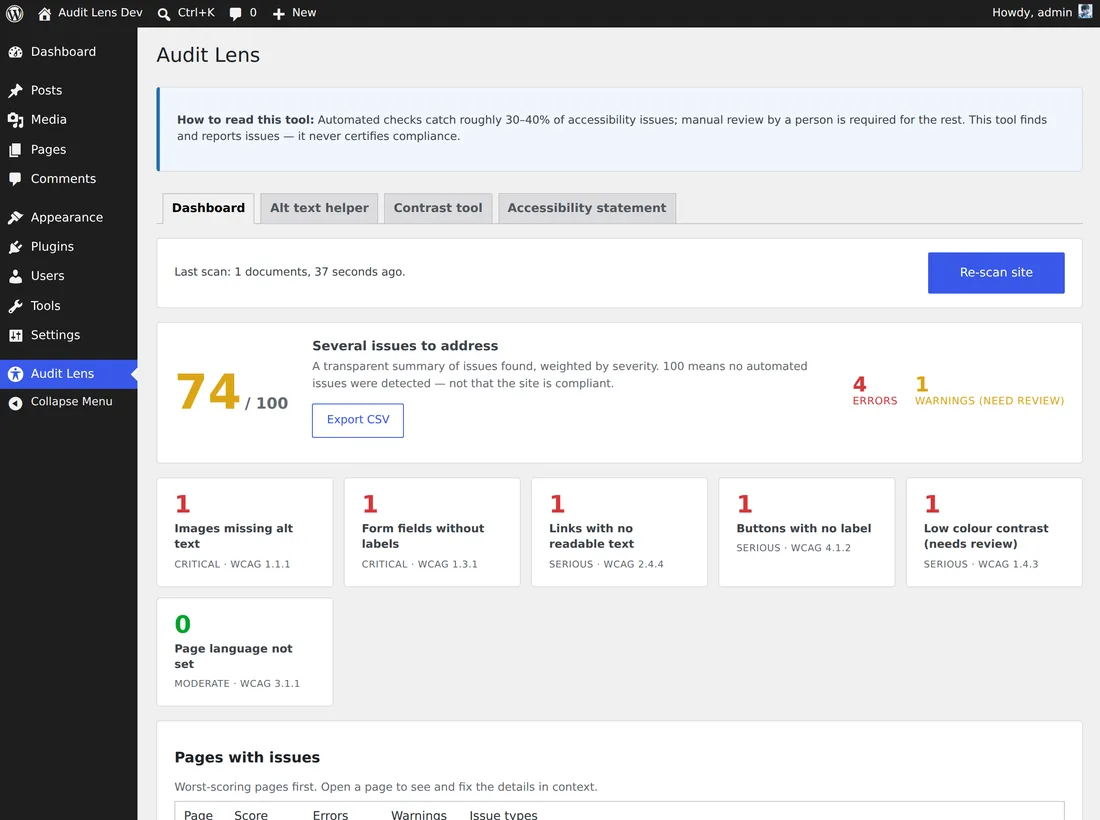
The Audit Lens site-wide accessibility dashboard listing detected WCAG issues in plain language.
All WordPress

Audit Lens

Audit Lens is an accessibility scanner. It finds the "WebAIM Million top six" issues, responsible for roughly 96% of detected WCAG failures, and explains them in plain language. It reports which checks you pass, rather than declaring your site accessible. Only a human can determine real accessibility.

Free

  • Top-six checks, site-wide scan
  • In-editor inline flagging

Pro adds

  • White-label client reports, auto-emailed to clients
  • Audit trail, VPAT/ACR draft
Learn more about Audit Lens
  • Margin Lens is a profit and cost-of-goods dashboard built on WooCommerce's native Cost of Goods Sold.

    • Gross-profit dashboard, per-order profit
    • Top products by margin
    • Historical cost backfill
    • Post-ad net profit, customer LTV
  • Widget Auditor shows which Elementor addon widgets your site uses, so you can cut the unused bloat safely.

    • Spot unused addon widgets
    • Site-wide scan, asset-weight analysis
    • Pre-deactivation dependency checks
    • Scheduled scans
  • Tag Toolbox adds the tag-hygiene tools FluentCRM is missing: merge tags, find duplicates, clear out the unused ones, rename in place.

    • Tag merge, duplicate cleanup
    • Remove unused tags, rename in place
    • Health score, auto-merge
    • Scheduled hygiene reports
  • Shortcode & Block Auditor finds the mess removed plugins leave behind: leftover broken shortcodes (raw [bracket] text) and broken Gutenberg blocks.

    • Find broken shortcodes and blocks
    • Pinpoint every occurrence
    • "Safe to deactivate?" dependency checks
    • Alerts for newly broken content
  • EAA Statement Forge is a zero-config wizard that produces an accessibility statement page and feedback mechanism aligned with EAA disclosure expectations (EN 301 549, complaint-body references for 27 EU states). It produces your own self-declaration, not a certificate or declaration of conformity from us.

    • Statement generator, feedback mechanism
    • Complaint-body references for 27 states
    • Annex V clause generator, multilingual
    • Version history, review reminders

Questions you might have about Tendforge

Is the free version really free? What are the limits?
Yes. The free version lives on wordpress.org: free forever, no credit card, no trial period, no features locked behind a timer. It's a complete tool on its own, not a trial for Pro. Pro is an optional add-on, and the free version works without it.
How does Pro work and how is it licensed?
Pro is a paid upgrade that runs alongside the matching free version. It layers on advanced features: scheduled scans, emailed reports, white-label client reports, automation. Your free-version data and settings carry over.
Can Audit Lens guarantee my site is "compliant"?
No. Audit Lens finds and reports issues and tells you which checks you pass, but it never declares your site "accessible" or "compliant". Only a human can determine real accessibility. The consensus estimate: automated scans catch at most about 30–50% of WCAG issues. We say so directly, instead of pretending you're compliant.
Does the EAA Statement Forge output have legal force?
It produces a self-declaration statement based on the official EU template and EN 301 549, for informational and self-help use. It is not legal advice, nor a third-party certification or declaration of conformity. You are responsible for the accuracy of the statement; consult a professional if in doubt.
Are these plugins safe? Will they slow my site down?
Each one follows the WordPress security baseline (nonces, capability checks, input sanitizing, output escaping) and uninstalls cleanly, removing its own data and scheduled events. The auditing tools run on demand or on a schedule. They don't sit on the front end, so they don't affect visitor load times.
Do I need to install all six?
No. The six plugins are independent, and each solves a different problem. Install the one you need now; there are no dependencies between them.

Pick a problem you're stuck on, and start with the free version

No money up front, no contract. Upgrade to the matching Pro when you need the advanced features.

Want it built for you? We also set up and build WordPress sites: see our done-for-you service.